
SmartM365 Device Registration Tool
Standalone local tool for User-mode diagnostics, guarded Admin repair actions, support bundle export, and GitHub release verification for Entra registration and Hybrid Join support.
View tool detailsTools
Operational utilities and field-oriented tools built to accelerate troubleshooting, remediation, inventory, and analysis for Modern Workplace and enterprise IT environments.
Standalone local tool for User-mode diagnostics, guarded Admin repair actions, support bundle export, and GitHub release verification for Entra registration and Hybrid Join support.
View tool detailsStable 0.3.0 for local Intune and Windows diagnostics, HTML reports, restricted redacted-text export and explicit updates via PowerShell Gallery or a verified GitHub bundle.
View tool detailsBrowse, edit, publish, export, and reset Microsoft Intune remediation packages.
View tool detailsNotify users, manage restart timing, and support controlled endpoint reboot workflows.
View tool detailsUse fast operational checks for host pools, session hosts, user sessions, FSLogix profiles, Citrix brokers, VDAs, and delivery groups.
Open VDI checksUse quick Microsoft 365 checks for mailbox, site, storage, tenant, sharing, and service health signals.
Open M365 checksSmart Operational Tools
Field-oriented utilities for remediation publishing, endpoint restart governance, diagnostics, VDI operations, Microsoft 365 collaboration checks, and repeatable workplace operations. Source files and documentation are published on GitHub for review, traceability, and version history.

Public v1.1 release with a verified standalone ZIP and published SHA-256 checksum. Browse local and cloud Intune remediations, edit scripts, publish packages, export execution reports, and reset remediation history through delegated Microsoft Graph authentication.

A local Windows notification app for controlled restart communication, configurable postpone choices, preview mode, safer state handling, clean logging, and multilingual user-facing restart prompts.
Transparency note: this website does not host direct software downloads. Smart Operational Tools source files, documentation, and operational notes are provided through GitHub for review, traceability, and version history.
Current GitHub tools
These entries reflect the current `khda79/workplacecloudhub.com` repository structure. They are GitHub source and documentation links, not direct executable downloads.
Stable 0.3.0 for local Intune and Windows diagnostics, HTML reports, restricted redacted-text export and explicit updates via PowerShell Gallery or a verified GitHub bundle.
View tool detailsPublic v1.1 release with a standalone ZIP, published SHA-256 checksum and release manifest. The PowerShell 7/WPF GUI browses local packages and Intune deviceHealthScripts, compares content, runs PSScriptAnalyzer, publishes or updates packages, exports scripts and reports, and can reset or delete cloud remediations.
View tool detailsPublic v0.1.0 release with standalone ZIP, clean IntuneWin package, exact version detection, PreviewOnly validation, and stable PowerShell Gallery module.
View tool detailsStandalone local tool for Hybrid Join and Microsoft Entra device registration diagnostics, User-mode review, guarded Admin actions, local support bundle export, and a public v1.0 release on GitHub.
View tool detailsStable v2.10.78 release for conservative LOT creation, PsExec-based SYSTEM repair, HTML and CSV evidence reporting, controlled stop, and technician-side run guards.
View tool detailsStable v0.1.72 release for preview-first LOT campaigns, hardware readiness diagnostics, setup media integrity validation, guarded Windows Update or setup upgrade actions, and HTML or CSV evidence.
View tool detailsPer-language Win32 package builders, cache-only payloads, setup media integrity validation, and Graph publishing helpers for scheduled-task-based upgrade rollouts.
Open source pathSubnet-aware lease template and operational guidance for controlled setup media copies across large estates.
Open source pathSharePoint migration validation with a WPF dashboard, HTML file and permission review summaries, Entra user cache exports for permission comparisons, mapping-driven local migrations, and guarded cleanup scripts.
Open source pathPowerShell campaigns and a common WPF launcher for Exchange migration notifications, archive mailbox activation messages, and mailbox size reduction communications with dry-run-first execution, Graph or SMTP sending, Exchange Online-first lookup, and Exchange 2016 fallback.
Open source pathRead-only PowerShell 7 and WPF preflight for Exchange hybrid migration batches, with GO or NO-GO verdicts across identity, quota, licensing, permissions, endpoint, and synchronization checks.
View tool detailsSmartWorkplaceCMDB 0.3.0-beta.1 (BETA): native collectors, isolated trial outputs, tenant-aware CSV tables, source collection evidence and local reporting. Offline tests passed; live tenant behavior and Power BI refresh remain unqualified.
Open source pathInventory scripts for discovered apps, managed devices, Endpoint Analytics, Autopilot, BIOS, compliance, remediation exports, Power BI and Fabric activity, Teams Phone usage, SharePoint tenant capacity, Windows Update, Copilot usage, and Autopatch alerts.
Open source pathAzure Resource Manager exports for governance, RBAC, cost optimization, network exposure, policy compliance, Defender for Cloud, backup, storage, Key Vault, and Advisor review.
Open source pathRead-only inventory for AVD host pools, workspaces, app groups, applications, desktops, session hosts, scaling plans, diagnostics, FSLogix storage posture, and cost optimization signals.
Open source pathCitrix on-premises inventory for CVAD site configuration, delivery groups, catalogs, applications, machine and session health, policies, hosting, StoreFront, and licensing.
Open source pathAudit and Preview inspect local readiness and write local configuration, logs and evidence. Launch starts Citrix, AVD or web access without changing Windows startup; Hybrid offers a provider choice.
Apply and Restore require administrator rights, local configuration gates and confirmation phrases. Apply can change machine startup and policies for all users; kiosk options need separate prerequisites. Restore uses reviewed rollback files and does not delete created accounts.
Requires 64-bit Windows PowerShell 5.1 and WPF. The embedded legacy WebBrowser is not Edge/WebView2; current Citrix and Windows App portal compatibility is unvalidated. An external browser can be selected. Local detection and offline tests do not certify a remote session or kiosk deployment.
Source-folder distribution only: no dedicated release, installer, Gallery module or automatic updater was found on 9 September 2026. Follow the README for configuration, signatures, manual updates and validation limits.
Read setup and validation guidanceBeta 1.5.0-beta.1. Read-only workplace FinOps reporting with source-contract validation, readiness guardrails, executive HTML reporting, and CSV optimization outputs built from SmartM365 DATA-LAST exports.
Open source pathThis toolkit inventories and compares SharePoint content and permissions. It does not copy content. GUI 1.0.8 launches the selected migration folder even when its report label differs.
Keep the complete SharePointMigration folder from GitHub and start the dashboard CMD. The startup version check only reports updates; replacement is manual. Preserve local migrations and authentication files. There is no PowerShell Gallery installation workflow.
Copy _Template, change the configuration name, and review migration.mapping.txt. Each active line needs exactly two fields; encode spaces as %20 and keep comments on separate lines. SPO uses PnP.PowerShell on PowerShell 7.4 or later. SP2016/SP2019 scans use Windows PowerShell 5.1 on a SharePoint server. Python 3 handles comparisons and Excel exports.
File and permission scans need access to every selected site and object. Permission comparison also requires an Entra users cache and at least one SPO endpoint; interactive cache refresh requests User.Read.All and Directory.Read.All. Review consent and actual coverage with the administrator. Logs, CSVs and workbooks are not guaranteed anonymous.
Scan both sides, inspect errors, then compare versions, dates, sizes and permissions. Default maximum scan timestamp gaps are 12 hours for files and 24 hours for permissions. A report is not a completeness certificate. Review duplicates and generated cleanup scripts; they default to dry-run. No real migration or tenant cleanup was used for the offline regression checks.
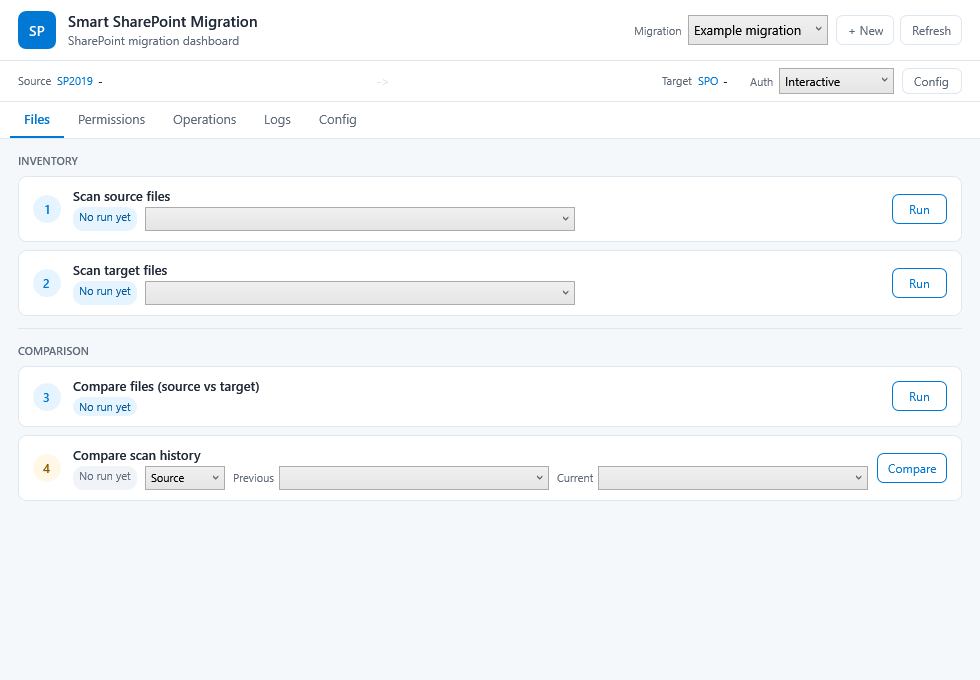
Transparency note: WorkplaceCloudHub links to source paths and documentation in GitHub for traceability. The website does not host direct software downloads.
Application screenshots
These screenshots show the operational interfaces behind the GitHub source paths, while keeping the website lightweight and free of direct executable downloads.

Stable 0.3.0 for local Intune and Windows diagnostics, HTML reports, restricted redacted-text export and explicit updates via PowerShell Gallery or a verified GitHub bundle.
View tool details
Interactive remediation package review, cloud comparison, script analysis, Intune publication, reporting, and execution history reset.
Open source path
WPF restart governance with recommended or required states, PreviewOnly testing, Intune Win32 packaging, and a stable PowerShell Gallery module.
View tool details
User-mode diagnostics, guarded admin actions, support bundle export, and standalone release packaging for Entra registration and Hybrid Join support.
View tool details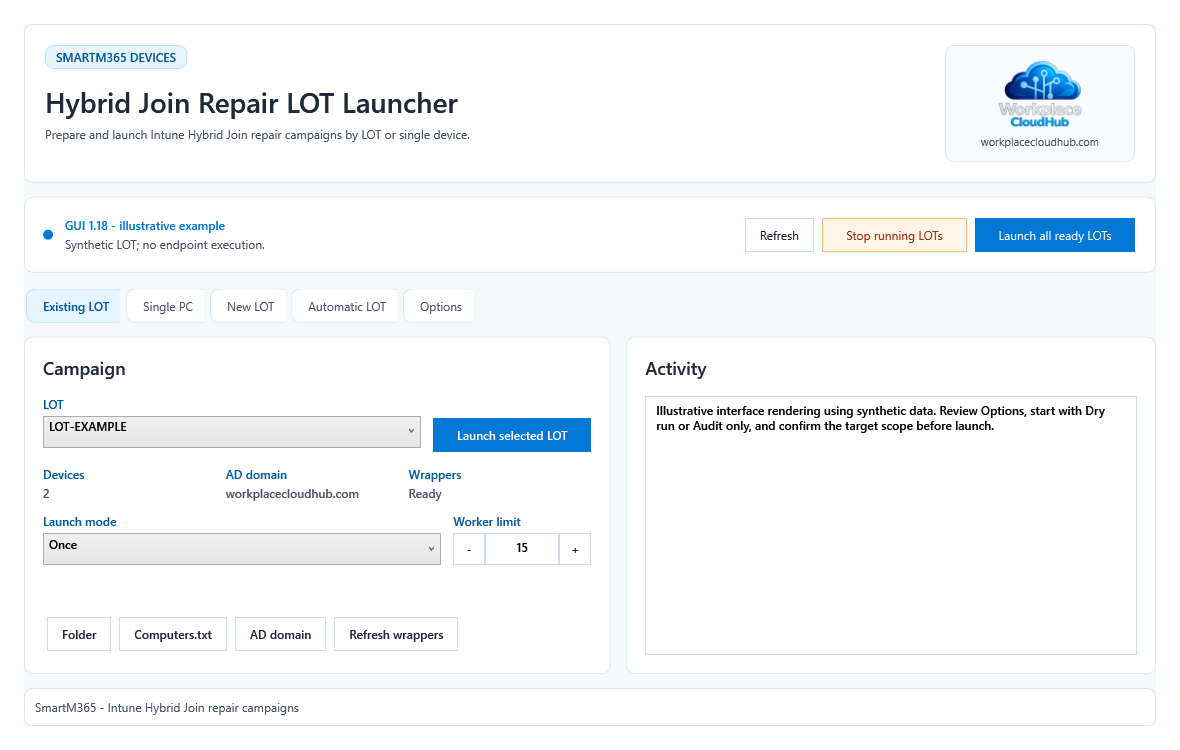
Stable v2.10.78 toolkit for conservative LOT creation, PsExec-based SYSTEM repair, HTML reporting, and guarded Hybrid Join recovery across device batches.
View tool details