Stable packaged release for LOT-based Hybrid Entra Join and Intune enrollment repair, with conservative AD, Intune, and optional Entra selection, a local WPF launcher, PsExec-based SYSTEM execution, and evidence-first reporting.
Microsoft Entra / Intune / Active Directory / Windows / PowerShell
Stable public release for controlled batch repair
This release packages the signed Hybrid Join toolkit for local review, LOT creation, guarded repair orchestration, and HTML or CSV evidence collection. It links the public GitHub release assets directly and keeps the website free of bundled binaries or tenant data.
Create operator-reviewed LOT folders manually or build conservative automatic LOTs from AD and Intune inventories, with optional Entra enrichment, collision filtering, exclusion evidence, and preview exports before any repair window starts.
WPF
Local WPF launcher and SYSTEM workflow
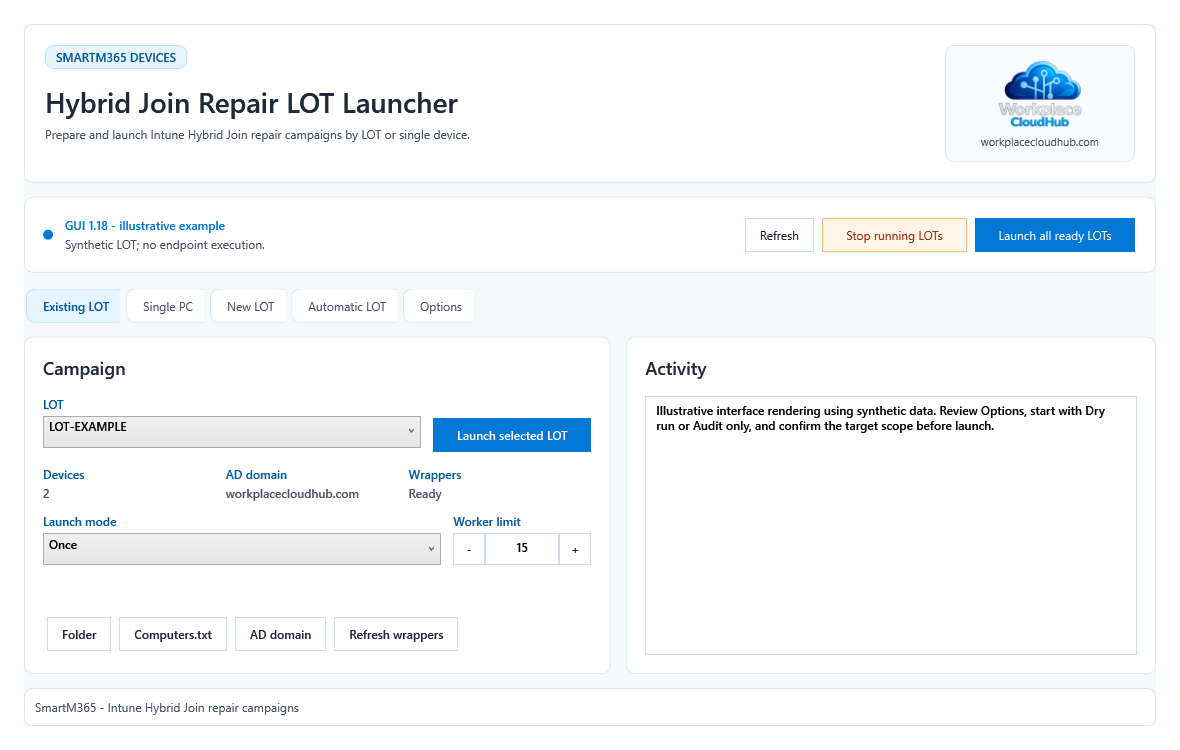
Use the WPF LOT launcher to create or open LOT folders, validate PsExec availability, and launch the autonomous signed repair workflow that runs on endpoints as SYSTEM through PsExec.
GRD
Guarded repair and reboot controls
Hybrid Join fixes, Intune enrollment repair paths, and reboots stay guarded through evidence checks, repair path flags, reboot limits, and Preview or Audit-first workflows instead of blind destructive actions.
RPT
CSV, HTML, and collected evidence
Each run keeps live CSV status, final CSV results, merged HTML summaries, PsExec logs, central evidence folders, and automatic run archives so support teams can review what happened before re-running anything.
Requirements, launch confirmation and validation limits
The GUI requires Windows PowerShell 5.1 with STA. LOT orchestrators prefer PowerShell 7 with a 5.1 fallback. Install PsExec separately; remote operations require authorized target administrator access, DNS, administrative shares and remote service execution. AD exports require RSAT ActiveDirectory and directory read access.
Automatic inventory refresh uses Microsoft.Graph.Authentication with delegated DeviceManagementManagedDevices.Read.All and Device.Read.All consent. AD and full Intune inventories are required; Entra enrichment is optional. Inventory export does not require Graph write permissions.
Preview evaluates inventories and writes local evidence. Create never launches a LOT. Dry run suppresses endpoint payload execution. Audit only collects remote diagnostics and writes evidence without repair; it is not a zero-write operation. GUI 1.18 asks for target, mode and repair authorization confirmation before LOT, all-LOT and single-PC launches, with No selected by default. Direct CMD launches retain their documented repair defaults.
There is no automatic updater or Gallery module. Verify the ZIP checksum and Authenticode, approve the self-signed certificate through your organization, then extract updates into a separate folder. The CMD uses ExecutionPolicy Bypass and does not verify signatures for you. Preserve LOT configuration and evidence, review saved options and refresh imported wrappers before reuse.
Version 2.10.78 passed five local synthetic suites on PowerShell 5.1 and 7, package signature checks and GUI ValidateOnly. These checks cover selection, MDM classification, launch confirmation, stop signals, mutex and worker-lease behavior. No live tenant repair, remote PsExec execution or reboot was tested. Generated evidence can identify devices, users and tenants and is not automatically anonymized.
Interface illustration: GUI 1.18 rendered from the current XAML with synthetic LOT-EXAMPLE data; no endpoint run is shown.
Validated capabilities
Built for cautious batch recovery, not opaque remediation
The stable toolkit supports manual LOT folders and automatic LOT creation with conservative AD, Intune, and optional Entra selection logic. Automatic mode can filter by literal computer-name contains values, exclude devices already present in Intune, apply stale-AD exclusion, preserve preview evidence, and create the LOT without launching it.
The endpoint workflow is autonomous and signed, which lets the same repair script run as SYSTEM through PsExec while the launcher keeps local concurrency limits, technician-side run guards, backoff history, and controlled-stop behavior for long repair batches.
Reports stay local and supportable: live HTML and CSV cycle reporting, endpoint evidence collection, changed-state inventory refresh, archived prior runs, and clear audit signals before broader repair actions are enabled.
Security and package scope
Signed scripts, no bundled PsExec, and no private data in the release
PsExec is not redistributed in the public package and must be obtained separately from Microsoft Sysinternals. The launchers look for PsExec.exe in the toolkit, Windows system paths, or PATH, but the release ZIP itself does not ship that binary.
The package does not include any customer LOT, inventory export, log, report, tenant identifier, device name, or account data. PowerShell scripts are Authenticode-signed by workplacecloudhub.com, and the repository license for the release remains GPL-3.0.
Expected ZIP SHA-256: 2408EA8202A32524A21524951916C2F3438BA05D2C86E96BD41A4CE420D68801
Quick start
Download, verify, extract, add PsExec, and start with audit evidence
1. Download the public ZIP package from GitHub Releases.
2. Verify the ZIP against the published SHA-256 file and expected hash 2408EA8202A32524A21524951916C2F3438BA05D2C86E96BD41A4CE420D68801.
3. Extract the complete ZIP to a local folder.
4. Download PsExec separately from Microsoft Sysinternals and place it where the launcher can find it.
5. Run Start-IntuneHybridJoinRepair-LotLauncher-GUI.cmd from an elevated operator session when required; the CMD does not elevate automatically.
6. Start with Preview or Audit evidence, review the generated LOT and run reports, then enable guarded repair actions only after the pre-checks are clean.
Current source path
GitHub remains the source of truth.
The current GitHub code path is SmartM365/Devices/IntuneHybridJoinToolkit. The public release tag is intune-hybrid-join-toolkit-v2.10.78, the published source commit is 469303e07bcf1cf394e6fb4fdc800eae6638205c, and the repository license is GPL-3.0. View source commit.